BjOdds: Blackjack Software to Calculate Precisely the Dealer Bust Odds, House Edge, House Advantage
By Ion Saliu, ★ Founder of Blackjack Mathematics
Sale Withdrawn for Pricing and Patent Considerations

Version 21, June 2014; New Software.
BjBustOdds precisely generates all favorable cases (busted hands) and all possible cases (total blackjack actions). Thus, mathematically precise calculations of the blackjack odds and house edge are possible for the first time ever. The historic algorithms are here for everybody to see, read, comprehend, and fully verify. The old bust odds, as previously calculated by John Scarne, had a quite large margin of approximation.
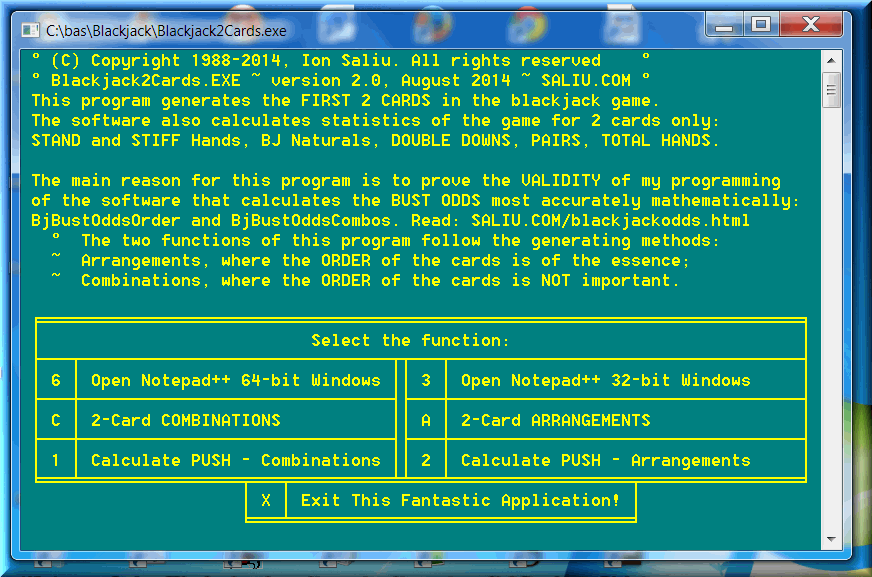
A visual presentation of the BjBustOdds software follows. It can't be more intuitive and informative, especially given the intellectual level of the potential buyers!


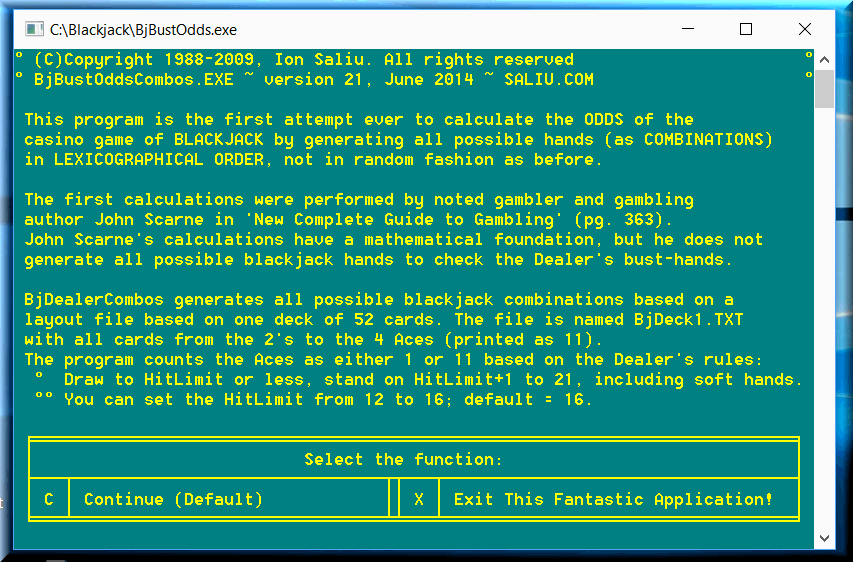
This blackjack package does not need installation, if you downloaded BjBustOdds to a folder on your hard drive; e.g.: C:\BjBustOdds
The best method is to go to the Command Prompt (Windows 2000 and later). Create a directory (folder); e.g. C:\BjBustOdds. You can do that in Windows Explorer as well. Download BjBustOdds to C:\BjBustOdds. Click on BjBustOdds.exe to decompress the file automatically.
To begin, navigate to the C:\BjBustOdds folder and click on BjMenu. If you right-click on BjMenu you can create a shortcut on your desktop.
For the best results, work at the Command Prompt in C:\BjBustOdds. Navigate to the C:\BjBustOdds folder in a Command Prompt and type at the C:\BjBustOdds prompt:
BjBustOdds
This is the recommended method as speed of execution is gained.
Let's stay in the GUI for a little longer. We need to create a few useful batch files to make the command prompt environment even more productive. Simply open that unheralded Notepad. The batch files must be in text format (plain vanilla formatting for computer files). I have this batch file named MA.BAT (MA indicates macros). Instead of typing, you can copy and paste the following lines (without any blank line):
@ECHO OFF
PATH C:\;C:\BAT\;C:\BAS\;C:\LOTTERY\;C:\BjBustOdds\;%PATH%
PATH C:\;C:\BAT\;C:\BAS\;C:\LOTTERY\;%PATH%
doskey co=copy $1 $2
doskey d=dir /O:N /P
Any time you start a command prompt session, you type MA (or ma) at the C: prompt. The batch file has also useful shortcuts created for the DOSKEY utility (automatically loaded by Windows). For example, the great utility PermuteCombine (generator of permutations, combinations and more) resides in a BAS folder. I just type per to start the application.
Save it as MA.BAT (at the C:\ prompt). Save the file in Notepad (you may need sometimes to surround the name by “ “ to be sure it saves a text file with the BAT extension): Name: "MA.BAT" in drive C: (root directory); Save as type: All files; Encoding: ANSI.
Copy and paste now an example batch file to abbreviate the start of the BjOdds package. Again, simply copy and paste the 4 lines:
@ECHO OFF
CLS
C:
CD\BjBustOdds
BjBustOdds
Save this file in Notepad as BJ.BAT, but this time in the C:\BAT\ folder. The REM command does one thing only: Disables the DOS command that follows it; that is, the rest of the line will have no effect.
You can create similar batch files for Bright6 (L6), or any other LotWon software package. After you start the Command Prompt session, type ma (and press Enter); then type bj (and press Enter); you will navigate automatically to the C:\BjOdds\ folder.
You can navigate anywhere at the command prompt by using the CD command (Change Directory). For example, you are at the C: prompt. If you want to navigate to C:\BjBustOdds\, type:
cd\BjBustOdds
If you want to go back to the root directory C:\ from C:\BjBustOdds\ type:
CD\
Of course, if you can convert the source code to a 64-bit compiler that creates TRUE 64-bit EXE files that run in a 64-bit operating system (e.g. Windows 7 or 8).
The source code was compiled with: PowerBasic Console Compiler (PBCC), version 4.04. Older or newer versions of PBCC may or may not work with the source code in this package without modifications.
You, the programmer, assume full responsibility for such tasks.
The source code is adequately commented for the average programmer. You should be at least an average programmer who worked with PBCC for around five years.
There is NO programming support offered whatsoever. If your programming language is different, you need help from PBCC programmers to translate my source code to your programming language of choice.
The files in this package - BjBustOdds:
2. BjBustOddsOrder
3. BjBustOdds
4. BjDeck1.TXT
5. BjDeck2.TXT
6. BjDeck1-11.TXT
7. BjDeck4-11.TXT
8. BjDeck1Shuf.TXT
9. BjDeck1Rev.TXT
10. BjAllHands1Combos.TXT
11. BjAllHands2Combos.TXT
12. BjAllHands1-11Ord.TXT
13. BjAllHands4-11Ord.TXT
How can we apply the new programming to determine the bust odds for the blackjack Player? After heated debates in forums in 2014, I simply modified my software. The hit-stand limits can be set by the user. Initially, it was fixed — the ubiquitous hit all 16s and under, stand on all 17s or greater.
The software user can set the hit-limit to any value. The choices are, obviously, from 12 to 16. I tried, for example, the hit limit to 11 — that is, hit anything 11 or under, stand on anything 12 or higher. Evidently, there is no bust in such situations. That's another proof that my programming is 100% correct.
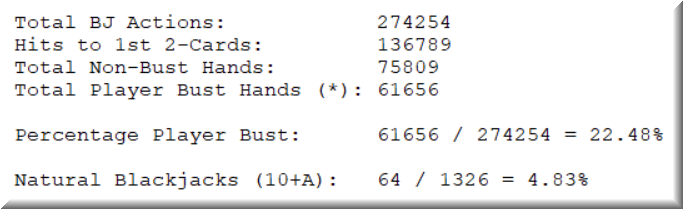
I believe that setting the hit limit to 14 or 13 reflects pretty closely the bust odds for the Player. That is, stand on 15 or greater (as arrangements):
Or, stand on 14 or greater (as arrangements):
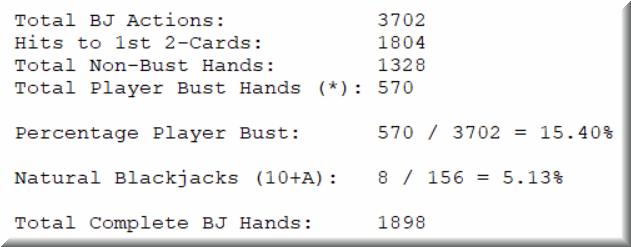
Now, the house edge goes between something like .3355 * .2248 = 8.3% and something like .3355 * .1978 = 6.6%. It averages out to 7.5%. It is a far cry from the intentionally false house advantage (HA) of 1%, or even .5%! The overwhelming majority of blackjack players lose their bankrolls quickly, because this is NOT a 50-50 game or so much close to that margin! And always be mindful that blackjack is strongly sequential: The Dealer always plays the last hand. Otherwise, the casinos would go bankrupt!
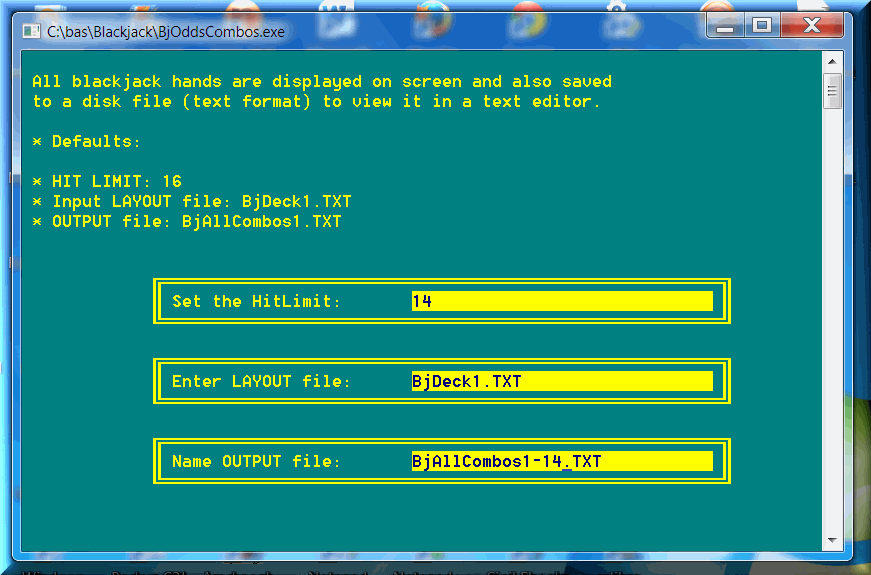
There are plenty of text files for you to take a good look at. They are absolutely FREE to view and even download to your PC. For viewing, I recommend a great text editor (also free): Notepad++. The text files show how the odds vary for different hit-limit settings. If you right-click a link, you can download it to your computer. If you just click, the text files open directly in the browser.